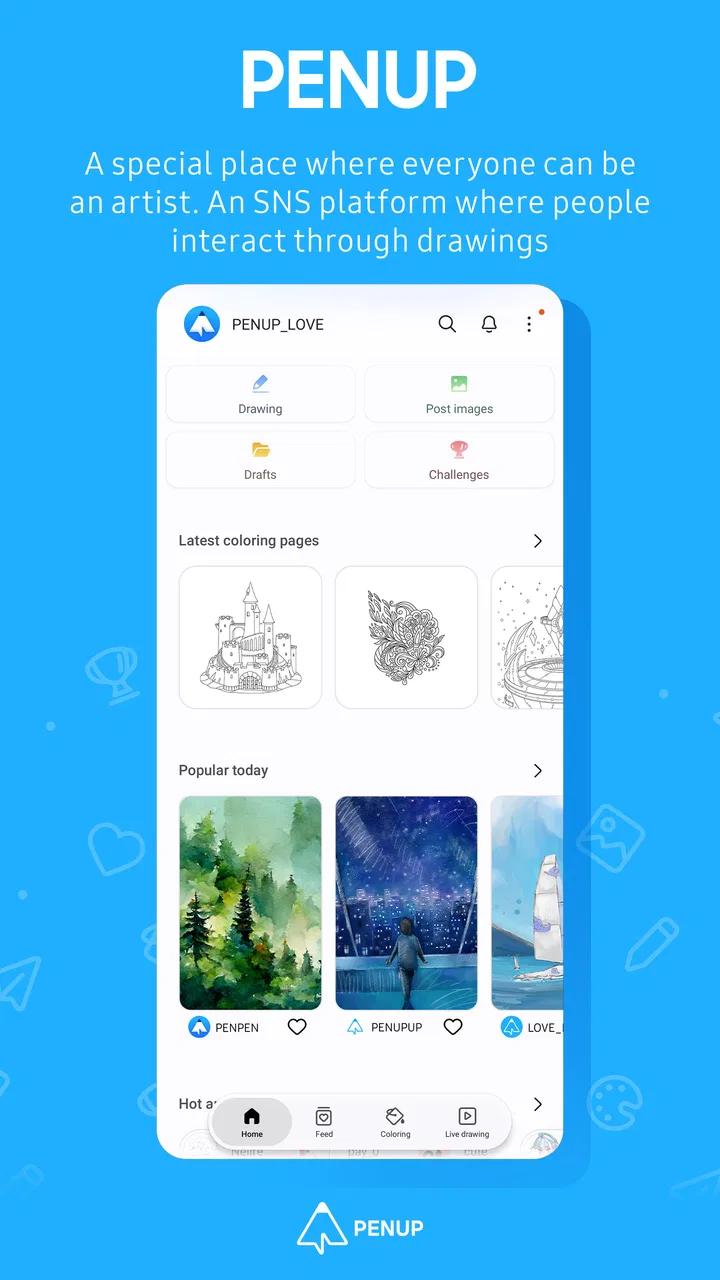
PENUP – Drawing-sharing SNS
- 4.5
- Rating
- 100.00M
- Installs
- Free
- Price

 Analysis by App-foxy
I came away from PENUP thinking of it less as a conventional drawing program and more as a relaxed social sketchbook. Its main appeal is the way drawing and sharing sit together: I can make something, browse what other people have created, and use that activity to keep myself drawing instead of treating creativity as a once-in-a-while project. That makes it a distinctive choice in the Art & Design category, especially for people who want encouragement and inspiration alongside a digital canvas.
My overall view is positive, but with an important qualification. I would recommend it to a casual artist, a beginner, or anyone who enjoys seeing how other people approach the same visual idea. I would not choose it as my only tool for professional illustration, detailed photo editing, or a private portfolio workflow. PENUP is strongest when the social side matters as much as the act of putting down a line.
What makes the drawing community useful
The app is developed by Samsung Electronics Co., Ltd., and it has grown well beyond a small experiment. It has more than 100 million installs and an average rating of 4.5 from roughly 220 thousand ratings, with about 12 thousand written reviews. Those figures do not tell me whether every artist will enjoy the experience, but they do fit what I noticed while using it: this is designed to be approachable, visible, and easy to return to.
You May Also Like

 AccuWeather: Weather Radar
AccuWeather Review: A Quick, Clear Forecast for Everyday Decisions
For everyday plans, the best forecast is the one you can understand quickly. AccuWeather makes rain timing, radar, and local conditions easy to act on, with a few trade-offs.

 Hill Climb Racing
Why Hill Climb Racing Still Turns Crashes Into One More Run
A tiny car, a bumpy hill and one more upgrade: Hill Climb Racing keeps resurfacing because its simple chaos makes every near-miss feel personal.

 AliExpress - Shopping App
AliExpress Makes Global Shopping Feel Personal, but Shoppers Bear the Risk
AliExpress turns a global marketplace into a pocket-sized discovery engine. Its reach is useful, its shopping loop compelling, and its trade-offs easy to miss.

 Lords Mobile: Kingdom Wars
Lords Mobile Is a Kingdom-Building Routine, Not a Quick Match
A case-by-case verdict on the building, battles, device demands, and social commitments that make Lords Mobile rewarding for some players and exhausting for others.

 PDF Scanner app - TapScanner
TapScanner Makes Paperwork Easier to Capture, Check, and Share
TapScanner makes scanning with a phone feel less like a rescue operation and more like a dependable step in getting work done. Its capture tools are useful, though not flawless.

 Block Blast!
Block Blast! Shows How Much a Puzzle Game Can Leave Out
A quiet grid game shows why puzzle players increasingly value instant clarity, repeatable skill and low-pressure play—and where the genre still needs to catch up.
More From Our News Desk
View All News


The first thing I liked was the low pressure. Opening a blank canvas can feel demanding because it asks me to invent everything at once. A drawing-centered social app changes that feeling. I can look at other work, notice a technique or subject that interests me, and then start with a more concrete idea. For a beginner, that small shift matters. The app gives drawing a sense of routine rather than making every session feel like a test of talent.
That community focus also changes how I judge the interface. A purely technical illustration app is usually evaluated by its control over brushes, layers, selection tools, and export options. Here, the creative environment is part of the product. The ability to communicate through drawings is not an extra placed beside the canvas; it is the reason the app feels different from a standard sketching utility.
I found this especially useful during short breaks. If I have only a few minutes, I can browse for inspiration rather than spending the whole session deciding what to draw. On a longer evening, I can use that initial browsing as a warm-up before working on my own image. This makes PENUP a practical companion for people who want to build a habit but often lose momentum before starting.
A gentle entry point for beginners
Someone who has never used a digital drawing app may feel intimidated by professional tools. Those apps can be excellent, but their depth often creates a learning curve before the user has made anything enjoyable. PENUP feels better suited to experimentation. I can approach it with a simple goal, such as practicing outlines, trying a color combination, or recreating a familiar subject in my own way.
One useful strategy is to treat the community as a visual lesson rather than a popularity contest. Instead of only looking for polished finished pictures, I would pay attention to repeated choices: how artists simplify faces, where they leave empty space, how they use contrast, or how a limited palette changes the mood. That kind of observation turns casual browsing into practice. It is one of the app's less obvious strengths because the learning comes from comparing approaches, not from being handed a formal course.
The social setting can also help people who are nervous about sharing art. A drawing does not have to be a finished masterpiece to have value in this environment. The act of posting can become a way to mark progress. For a young artist, that may be motivating; for an adult returning to a forgotten hobby, it can make the first steps feel less solitary.
There is a trade-off, though. Public sharing can make a creative hobby feel performative if I start measuring every drawing by how much attention it receives. My advice is to decide what I want from the app before browsing for too long. If the goal is practice, save the most useful ideas and return to the canvas. If the goal is conversation, accept that the social side may shape what I choose to draw.
Where it fits beside other art apps
Compared with a traditional standalone sketchbook app, PENUP offers a stronger sense of audience and discovery. A private sketching tool is usually better when I want uninterrupted work, personal notes, or a completely controlled archive. PENUP is better when I want to see other drawings and feel connected to people who are also making art.
Compared with a full professional illustration suite, its attraction is accessibility rather than maximum control. A specialist tool is the better choice for complex compositions, demanding production work, or a carefully managed professional pipeline. I would not replace that kind of software with PENUP if my work depended on advanced editing precision. The two types of app serve different moments: one supports serious construction, while the other makes drawing feel social and approachable.
It also differs from a general social network. On a broad platform, artwork competes with every other kind of post. Here, the creative subject is central, so browsing feels more focused. That focus is valuable when I want visual inspiration without sorting through unrelated content. At the same time, a dedicated art community can feel narrower if I am looking for wider lifestyle discussion or a general-purpose messaging experience.
The best way to use it alongside other tools is to give each app a clear job. I would use PENUP for prompts, inspiration, casual practice, and sharing. I would keep a more specialized editor for work that needs extensive refinement. That division prevents disappointment and lets PENUP do what it is actually good at instead of judging it by standards meant for a different kind of software.
Everyday workflows that make sense
A realistic routine might begin on a commute or during a quiet coffee break. I could browse a few drawings, choose one visual idea rather than copying an entire image, and make a quick study of it. Later, I could return to the same concept and develop it more carefully. This two-stage approach is more effective for me than waiting for a large block of free time, because the first session removes the fear of a blank page.
Another useful workflow is a personal theme week. I might focus on hands, plants, buildings, or expressions and use the community to collect different interpretations. The point is not to reproduce someone else's work. It is to notice how many solutions exist for the same subject. That exercise helps me avoid drawing the first symbol that comes to mind and encourages more deliberate choices.
I also like the idea of using the app as a progress diary. Posting occasional studies gives a visible record of how my confidence and style change. This is more meaningful than keeping every attempt hidden in a folder that I never open. However, I would still keep important originals elsewhere if they matter to me. A social feed is useful for sharing and reflection, but it should not automatically become my only personal archive.
For families, the age guidance matters. PENUP carries a Teen content rating, so I would not hand it to a younger child without checking whether the social environment fits the family's expectations. The drawing activity itself may be suitable for many beginners, but the presence of communication and shared artwork means parents should think about the community aspect, not just the art tools.
The limitations I noticed
The biggest weakness is that the social design can distract from focused drawing. I may open the app intending to practice for twenty minutes and spend most of that time browsing. Inspiration is helpful, but it can quietly turn into comparison or passive scrolling. Users who want a calm, private workspace may find this structure less comfortable than a dedicated sketchbook.
There is also a difference between seeing an appealing finished drawing and being able to reproduce its quality. A community feed naturally emphasizes results, while the difficult stages of experimentation are less visible. Beginners may therefore underestimate how much practice sits behind polished work. I think the app works best when I treat other artists as sources of ideas, not as a scoreboard.
Another limitation is purpose. PENUP is not the app I would pick for every art task. If I need a highly controlled professional workflow, detailed image manipulation, or a private place to organize client projects, I would look elsewhere. That is not a flaw in the concept so much as a boundary that should be understood before downloading it. Its identity is built around drawing and communication, not around replacing every creative tool.
The social element can require discipline as well. Sharing can be encouraging, but it can also influence the subjects and styles I choose. If I notice myself drawing only what seems likely to attract attention, I would step back and make a few private studies before posting again. That small habit protects the personal side of the hobby and keeps the app from turning creativity into a popularity exercise.
Who should install it
I think PENUP is a particularly good fit for someone who owns a compatible mobile drawing setup and wants a friendly place to practice. It also suits beginners who need visual prompts, casual artists who enjoy showing progress, and experienced hobbyists who like seeing different interpretations of familiar subjects. The free price makes trying that style of creative community easy, which is important when a user is still deciding whether social drawing feels motivating or distracting.
It is also worth considering for anyone who struggles with consistency. The app's real value may not be a single spectacular drawing; it may be the reason I pick up the stylus again tomorrow. A small daily study, a quick look at another artist's approach, or a shared work-in-progress can keep the habit alive. That is a more modest benefit than replacing a professional studio, but for many people it is the benefit that actually leads to improvement.
I would suggest skipping it if the main requirement is privacy, advanced production control, or a distraction-free canvas. A private notebook app will be a better match for someone who never wants to publish work. A professional illustration program will be more suitable for complex projects. Someone who dislikes feeds, reactions, and social discovery may also find the central idea unappealing, even if the drawing side is enjoyable.
The app has been available since September 7, 2013, and its long presence helps explain why it feels like an established destination rather than a temporary novelty. Still, longevity does not remove the need to choose the right tool. I would download it because I want a drawing community, not because I expect one app to handle every stage of my creative work.
My recommendation
PENUP succeeds because it understands a simple problem: many people do not need another reason to admire art; they need a reason to make some themselves. By putting drawing and communication in the same experience, it lowers the barrier to starting and gives practice a social context. I found that more valuable than a long list of technical controls would have been for casual use.
Its weaknesses are equally clear. The community can interrupt concentration, public sharing is not ideal for everyone, and serious artists may need a more powerful companion for finished work. Those limitations keep me from calling it a universal art solution, but they do not undermine its central purpose.
My final verdict is that PENUP is best viewed as a free, social drawing space rather than a complete professional studio. If you want inspiration, gentle motivation, and a place to share visual experiments, I would recommend giving it a try. If you want private, highly technical, uninterrupted production, choose a dedicated drawing application instead. For the right user, this app makes the difference between thinking about drawing and actually opening the canvas.
FAQs for PENUP – Drawing-sharing SNS
01What is the primary function of the PENUP app?
PENUP is designed as a social networking service for artists, allowing users to create, share, and explore digital artwork. It offers a platform for artists to engage with a community, participate in challenges, and access a variety of drawing tools. The app encourages creativity and collaboration among both amateur and professional artists.
02Can I use PENUP without an internet connection?
While you can use some drawing features offline, an internet connection is required to access community features, upload your artwork, and participate in challenges. Offline usage is limited to creating art, which you can later upload once you're back online. The interactive and social aspects of the app are fully accessible only with an internet connection.
03Is PENUP suitable for beginners in digital art?
Yes, PENUP is beginner-friendly. It offers a range of tutorials and easy-to-use tools that cater to new users. The community-driven challenges and feedback from other users provide a supportive environment for learning and improvement. Whether you're just starting or looking to refine your skills, PENUP offers resources to help you grow.
04Does PENUP require any in-app purchases?
PENUP is free to download and use, with no mandatory in-app purchases. All major features, including drawing tools and community access, are available without cost. However, some optional content or features may be available for purchase to enhance user experience, but these are not necessary for the full functionality of the app.
05What devices are compatible with PENUP?
PENUP is available for both Android and iOS devices. It is optimized for use with Samsung devices, particularly those with an S Pen, providing enhanced drawing precision. However, it is also fully functional on other smartphones and tablets, offering a versatile experience across different platforms.
Pros
- User-friendly interface for beginners.
- Diverse collection of drawing tools.
- Large community for inspiration.
- Regular art challenges and events.
- Easy sharing to social media platforms.
Cons
- Limited offline functionality.
- Contains in-app advertisements.
- No advanced editing features.
- Requires account to access full features.
- Occasional app crashes reported.

PENUP – Drawing-sharing SNS
Gallery